

Close Menu
Lyricsgoo.comLyricsgoo.com
    Facebook X (Twitter) Instagram
    • Privacy Policy
    • Contact Us
    Facebook X (Twitter) Instagram
    Lyricsgoo.comLyricsgoo.com
    Subscribe
    • Home
    • News
    • Entertainment
    • Health
    • Fashion
    • Tech
    • Travel
    • Tips
    • More
      • Album Songs
      • Hindi Songs
      • Tamil Songs
      • Telugu Songs
      • English Songs
      • Punjabi Songs
    Lyricsgoo.comLyricsgoo.com
    Home » Technology » How to Get Started with MiniTool MovieMaker 7.0.1: A Beginner’s Guide to Video Editing
    Technology

    How to Get Started with MiniTool MovieMaker 7.0.1: A Beginner’s Guide to Video Editing

    By EvelynOctober 26, 2023
    Facebook Twitter Pinterest LinkedIn Email Reddit Telegram WhatsApp
    How to Get Started with MiniTool MovieMaker 7.0.1: A Beginner's Guide to Video Editing
    Share
    Facebook Twitter LinkedIn Pinterest Reddit Telegram WhatsApp Email

    MiniTool MovieMaker 7.0.1 is a versatile and user-friendly video editing software designed to make the video editing process accessible to both beginners and intermediate users. Whether you’re creating personal vlogs, family vacation videos, or professional presentations, this software offers a simple yet powerful platform for editing and enhancing your video projects. With a range of features, including an intuitive user interface, media import capabilities, timeline and storyboard editing modes, and a library of transitions, titles, and effects, MiniTool MovieMaker empowers you to transform your raw video footage into captivating, polished content.
    As a lightweight and easy-to-use video editing tool, MiniTool MovieMaker is an ideal choice for individuals who are new to video editing but still want to produce high-quality videos. In addition to its basic editing capabilities, it also provides options for direct sharing to popular social media platforms, such as YouTube, and exporting your videos in various formats and resolutions. In this guide, we will explore the essential steps to get you started with MiniTool MovieMaker 7.0.1, allowing you to unleash your creativity and create impressive video content without the steep learning curve of more advanced editing software.

    Getting Started:

    To begin using MiniTool MovieMaker 7.0.1, you’ll first need to download and install the software on your computer. Once installed, launch the application. The user interface is straightforward and divided into key sections: Media, Preview, Storyboard, and Timeline.

    Importing Media:

    Start your project by importing the media files you wish to work with. Click on the “Import Media Files” button to select videos, images, and audio files from your computer. These files will appear in the Media library, making them easily accessible for your project.

    Creating Your Video:

    You can create your video on MiniTool MovieMaker through two primary modes: Storyboard and Timeline. In the Storyboard view, you can drag and drop your media files onto the timeline in the desired order. You can also add transitions, titles, and effects from the built-in library to enhance your video. The Timeline view offers more precise control over your video, enabling you to edit clips, adjust their length, add audio tracks, and fine-tune the timing of your project.

    Exporting Your Video:

    Once you’ve edited and enhanced your video to your satisfaction, it’s time to export it. Click on the “Export” button, and you’ll have several options for exporting your video. You can choose the output format, resolution, and quality. MiniTool MovieMaker also allows you to directly upload your video to popular platforms like YouTube or save it to your computer.
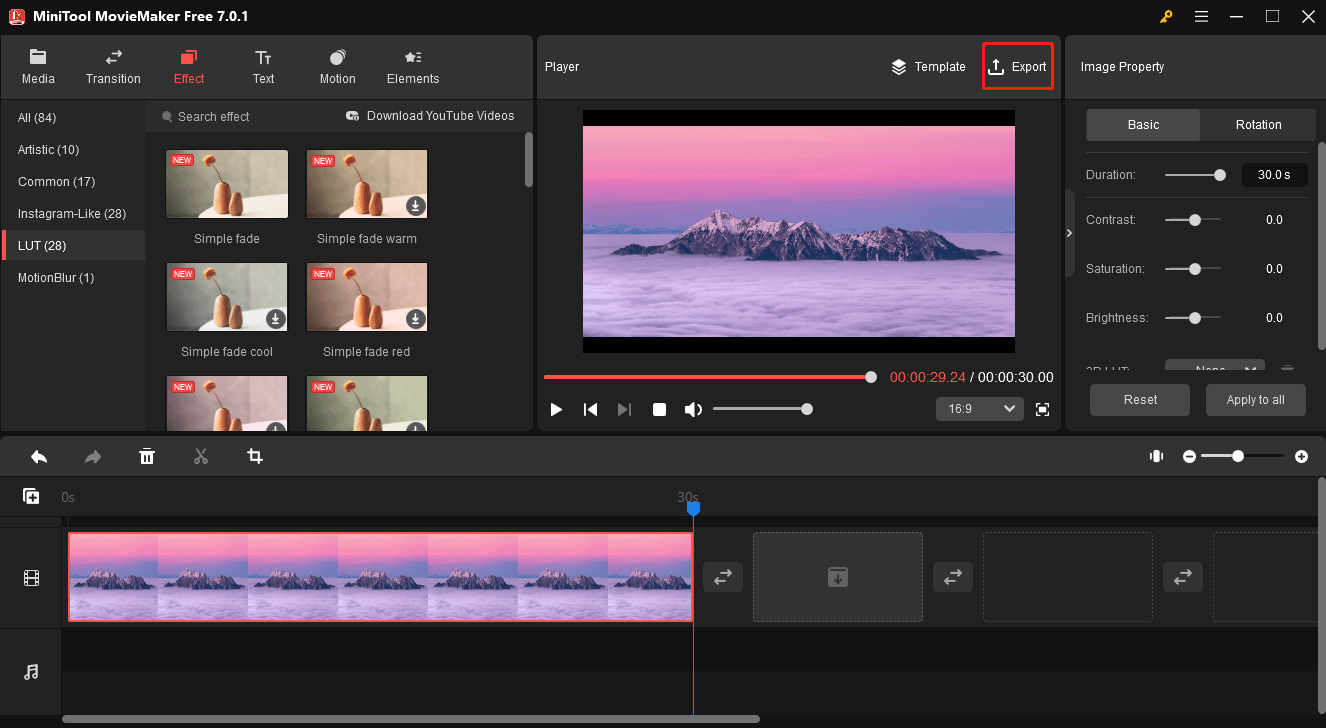
    How to Get Started with MiniTool MovieMaker 7.0.1: A Beginner's Guide to Video Editing

    Overall, MiniTool MovieMaker 7.0.1 is a user-friendly video editing tool that’s suitable for beginners and offers a range of basic to intermediate video editing features. It’s an excellent video editor for creating simple videos, slideshows, or vlogs without the complexity of more advanced video editing software.

    Share. Facebook Twitter Pinterest LinkedIn Reddit Telegram WhatsApp Email
    Previous ArticlePreserving Legacy Data: The Importance of CAD Conversion
    Next Article Ho Chi Minh City: A Blend of Modernity and History in Vietnam
    Evelyn
    • Website

    Greetings, fellow readers and word wanderers! I'm Evelyn, the creative mind behind lyricsgoo.com. On this captivating blog, we venture into the vast realms of literature, poetry, and everything in between. Get ready to be spellbound by the beauty of words and the power of storytelling. Join me on this literary odyssey, where we explore the art of expression and the magic of prose. From insightful book reviews to thought-provoking musings, lyricsgoo.com is your gateway to a world of captivating narratives.

    Related Post

    How to Use Kling Image Generation for Professional Results

    June 2, 2026

    Does Paying More for Tempered Glass Really Improve Protection?

    May 4, 2026

    Three Free Image to Image Platforms Worth Testing First

    April 9, 2026
    Add A Comment

    Most Popular

    Modern Healthcare Systems Depend Increasingly on Patient Education

    May 27, 2026

    Trending Black Saree For 2026

    May 26, 2026

    Can Dash Cams Protect Drivers Today

    May 26, 2026

    Zero Delay, Full Control: Why Smooth Streaming Is Essential for Live Matches

    May 26, 2026

    Popular

    What Approvals Should You Check Before Buying A Flat?

    June 1, 2026

    Wall-Mounted vs Freestanding Bathroom Accessories: Which is Better? 

    May 29, 2026

    Top Reasons Jaipur Youth Prefer LASIK Surgery

    May 29, 2026

    Our Picks

    How to Choose the Right Car Accident Lawyer in Laredo: Your Complete Guide to Protecting Your Rights

    May 29, 2026

    Why Regular Massages Are Essential for Your Health and Wellness

    May 29, 2026

    Hidden Weekend Hangouts Bringing Travelers Closer to Energetic Night Entertainment Communities

    May 29, 2026

    Subscribe to Updates

    Get the latest creative news from Lyricsgoo about daily updates.

    Facebook X (Twitter) Instagram Pinterest LinkedIn YouTube
    • Privacy Policy
    • Contact Us
    Lyricsgoo.com © 2026 All Right Reserved

    Type above and press Enter to search. Press Esc to cancel.