

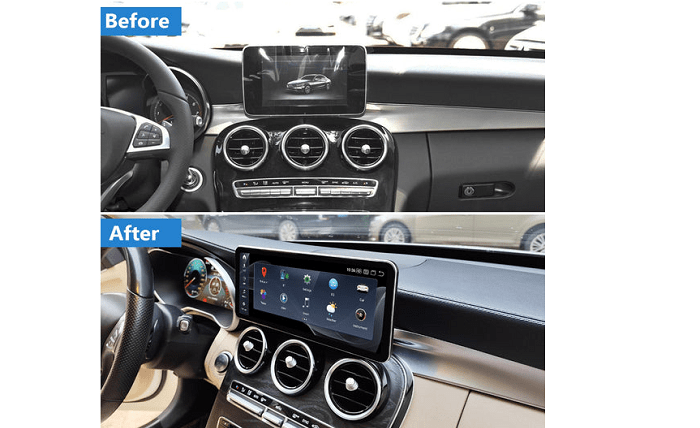
Every wrong turn, missed exit, or frozen loading screen while driving isn’t just frustrating — it can genuinely ruin your day. For modern drivers, in-car navigation has become as essential as the steering wheel itself, and the quality of that experience matters more than ever.
If you own a Mercedes-Benz, you’ve likely faced a quiet but persistent question: is the factory-installed navigation system actually good enough, or is it time to upgrade to an aftermarket Mercedes Android screen? The stock Mercedes system was engineered for reliability and deep vehicle integration, but it comes with real limitations that increasingly tech-savvy drivers find hard to ignore. Meanwhile, Android-based aftermarket screens promise a smartphone-level experience right on your dashboard — open apps, live traffic, streaming services, and more.
This comparison is written specifically for drivers who refuse to compromise: young professionals and tech enthusiasts who want their car’s interface to feel as intuitive and powerful as the devices already in their pockets. Whether you prioritize pinpoint navigation accuracy, a fluid touch screen experience, or a full smart media hub, this guide breaks down exactly what each option delivers — and which one truly earns the driver’s seat.
Understanding Your Mercedes Stock Car Radio Screen
Mercedes-Benz has spent decades refining its in-car technology, and the factory-installed navigation system reflects that heritage. Built around a philosophy of seamless vehicle integration, the stock car radio screen is engineered to communicate directly with your car’s onboard systems — think real-time fuel consumption data, parking sensors, and climate controls all accessible from a single interface. It’s a cohesive, purpose-built experience designed to feel like a natural extension of the vehicle itself.
The OEM system runs on proprietary software, which means Mercedes controls every layer of the experience — from how menus are structured to how map data is delivered. On paper, this sounds reassuring. In practice, it creates a walled garden. Map updates, while available, typically require either a dealer visit or a paid download, and they happen on a schedule that rarely keeps pace with rapidly changing road networks. The interface itself, though functional, often feels a generation behind what drivers interact with on their phones daily.
For tech-oriented drivers, the frustrations compound quickly. The app ecosystem is essentially non-existent — you get what Mercedes provides, nothing more. There’s no installing Google Maps for its superior live traffic data, no jumping onto Waze for crowd-sourced hazard alerts, and no streaming your favorite podcast through a dedicated app. Customization is minimal, and the touch response can feel sluggish compared to modern smartphone standards. For a driver who expects their car’s interface to match the intelligence of their other devices, the stock system’s limitations become impossible to overlook.
What is a Mercedes Android Screen? The Ultimate Smart Media Accessory
An aftermarket Mercedes Android screen is exactly what it sounds like: a replacement for your factory head unit that runs on the Android operating system. Rather than being locked into Mercedes’ proprietary software, you’re suddenly operating a full-fledged Android device mounted directly in your dashboard. It’s one of the most impactful Mercedes accessories available today, transforming what was once a basic control panel into a genuinely intelligent command center.
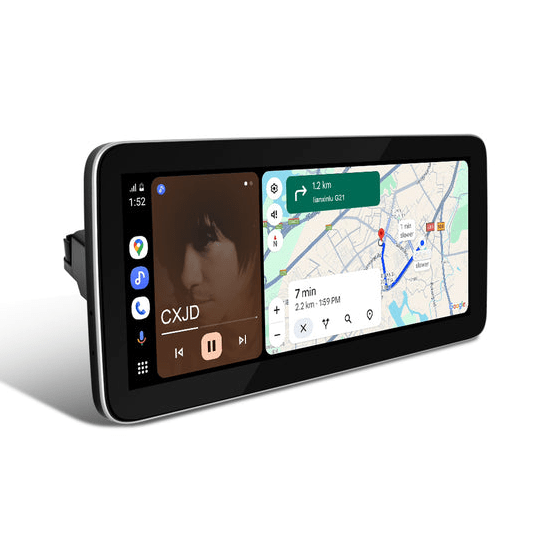
The core appeal is openness. Because these units run Android, the Google Play Store becomes your app library. Want Google Maps with its constantly updated satellite data and predictive traffic routing? It’s there. Prefer Waze for real-time crowd-sourced hazard alerts from other drivers on your exact route? Download it in seconds. The same goes for Spotify, Apple Music, YouTube, and virtually any navigation or media app you already use on your phone. Your dashboard stops being a limitation and starts being an extension of your digital life.
Beyond apps, the hardware itself represents a significant leap forward. Most quality Android units feature high-resolution IPS displays with responsive capacitive touch screens — the same technology used in premium smartphones — eliminating the sluggish tap-and-wait experience common to stock systems. Wireless Apple CarPlay and Android Auto support means your phone mirrors seamlessly onto the screen without fumbling for cables. Built-in 4G connectivity and Wi-Fi keep your maps and streaming services running independently, even without your phone nearby. For tech-savvy drivers, this isn’t just an upgrade — it’s a complete reimagining of what a car’s interface should be.
Head-to-Head: Navigation and Touch Screen Interface Showdown
Putting both systems side by side reveals a stark contrast — not just in features, but in the fundamental philosophy of how each one serves the driver. The stock Mercedes system was built to be dependable and deeply integrated; the Android screen was built to be powerful and perpetually current. For drivers who spend significant time behind the wheel navigating unfamiliar cities or sitting in stop-and-go traffic, that difference isn’t academic — it’s felt on every single drive.
Navigation Accuracy and Real-Time Data
The stock Mercedes navigation relies on pre-loaded map data that updates on a periodic schedule, meaning your system could be working from information that’s months or even years old. New roads, changed speed limits, and closed exits simply don’t appear until the next update cycle. Android screens sidestep this entirely by running Google Maps or Waze, both of which pull live data continuously. Google Maps recalculates routes using real-time traffic patterns and historical congestion data, while Waze layers in crowd-sourced reports of accidents, speed traps, and road hazards from drivers ahead of you on that exact route. Point-of-interest databases are also dramatically richer and more current, making spontaneous stops for fuel, food, or parking far less guesswork and far more precise.
User Experience: Touch Screen Navigation and Responsiveness
Anyone who has tapped a stock Mercedes screen and waited that half-second too long for a response knows how quickly interface lag erodes confidence in a system. The OEM touch screen, while functional, uses resistive or older capacitive technology that doesn’t match the immediacy drivers expect after years of using modern smartphones. Menus are layered and require deliberate navigation rather than intuitive gesture control. Android screens flip this experience entirely. Running on the same capacitive touch technology found in flagship phones, inputs register instantly. Home screens are fully customizable — pin your most-used navigation app front and center, arrange widgets for weather and media, and switch between functions with swipes that feel genuinely natural. The learning curve essentially disappears because the interface already behaves like a device you use every day.
Smart Media and Connectivity Integration
The stock system’s media capabilities are largely confined to radio, Bluetooth audio, and whatever Mercedes chose to include at the factory — a closed list that doesn’t grow. An Android screen opens the entire streaming ecosystem: Spotify, Apple Music, YouTube, podcast platforms, and internet radio all run natively through 4G or Wi-Fi without depending on your phone’s data. Wireless Apple CarPlay and Android Auto add seamless smartphone mirroring as a bonus layer, meaning your preferred apps, contacts, and messages appear on the dashboard exactly as they do on your phone — no cables, no friction, no compromise.
Practical Solutions: Upgrading for the Tech-Savvy Driver
Deciding to upgrade is one thing — executing it confidently is another. For tech-savvy drivers who’ve already concluded that the stock Mercedes system isn’t keeping pace with their expectations, the path forward is clearer than it might seem. The aftermarket Android screen market has matured significantly, meaning quality options exist across a range of budgets, and installation is increasingly accessible even for drivers without professional audio experience. The key is approaching the transition methodically: understanding compatibility, preparing properly, and configuring the new system to actually deliver on its promise from day one.
Step-by-Step Guide to Installing a Mercedes Android Screen
Start by identifying your exact Mercedes model, year, and trim level, then cross-reference that against the Android unit’s compatibility list — dashboard dimensions and connector types vary significantly across generations. Gather your tools: trim removal pry tools, a panel popper, and a wiring harness adapter specific to your vehicle. Carefully disconnect the battery before removing the stock car radio screen to avoid electrical issues. Slot in the new Android unit, connect the harness adapter, and secure the unit firmly before reassembling the trim. Power up the system, complete the initial Android setup, and immediately install your preferred navigation apps — Google Maps and Waze should be your first downloads.
Choosing the Right Mercedes Accessories and Features
Not all Android screens are created equal, and the specs you prioritize will shape your daily experience. Aim for a unit with at least an octa-core processor and 4GB of RAM to ensure smooth multitasking between navigation and media apps without stuttering. A 1280×720 or higher IPS display makes a visible difference in readability under direct sunlight. Confirm the unit supports wireless Apple CarPlay and Android Auto, built-in 4G and Wi-Fi, and steering wheel control compatibility — losing physical controls for volume and track changes is a frustration easily avoided. Brands like PEMP Car Audio offer units built specifically around these criteria, with model-matched fitment guides that take much of the compatibility guesswork out of the process. A manufacturer warranty of at least one year signals a product worth trusting long-term.
Stock System vs. Android Screen: The Verdict for Modern Mercedes Drivers
After putting both systems through their paces, the verdict is nuanced but clear. The stock Mercedes navigation system delivers genuine strengths — deep vehicle integration, factory-grade reliability, and a cohesive interface that works seamlessly with your car’s onboard systems. If your driving is mostly routine and you rarely venture into unfamiliar territory, it may serve you adequately. But for tech-savvy drivers who expect more, its limitations are real and growing harder to justify.
The aftermarket Android screen wins decisively on the metrics that matter most to modern drivers: live navigation data that’s always current, a touch interface that responds like the smartphone already in your pocket, and an open media ecosystem that puts Spotify, YouTube, and every navigation app you trust within reach. It’s not just an upgrade — it’s a fundamentally different relationship between driver and dashboard.
For young professionals and tech enthusiasts who refuse to accept a car interface that lags behind their other devices, the Android screen is the clear choice. It transforms your Mercedes from a capable machine with a dated control center into a genuinely future-proof smart vehicle. If navigation accuracy, interface fluidity, and connected media access are your priorities, the upgrade pays for itself on the very first road trip where you never once question whether your map is current, your route is optimal, or your playlist is one tap away.