

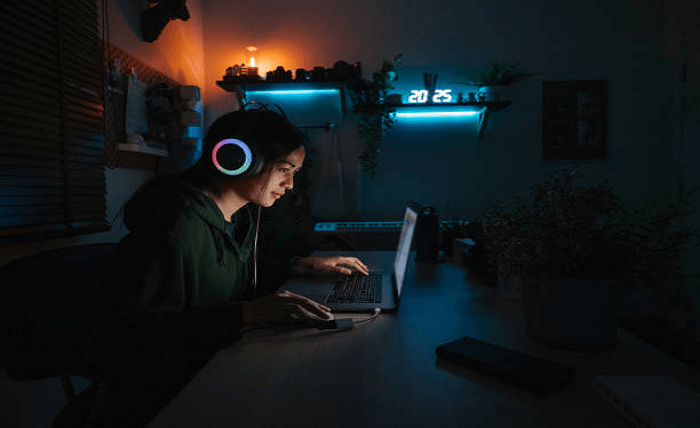
Creating the perfect gaming space is a dream for many gaming enthusiasts. Whether you’re a casual player or a hardcore gamer, having a dedicated area where you can immerse yourself in your favorite games can significantly enhance your gaming experience. This article will guide you through the essential steps to create a gaming paradise in your own home, ensuring you have the ultimate setup for comfort, performance, and enjoyment.
1. Choosing the Right Space
- Size: Ensure the room is large enough to accommodate your gaming setup, including your desk, chair, and any additional accessories.
- Lighting: Natural light is great, but it should be controllable to avoid screen glare. Consider a room with windows but make sure you can use blinds or curtains to manage the light.
- Noise Level: Choose a space that is relatively quiet to avoid disturbances. If this isn’t possible, consider soundproofing options.
2. Setting Up Your Gaming Desk
- Size and Shape: A larger desk provides more space for multiple monitors and gaming accessories. L-shaped desks are a popular choice as they offer ample space and fit well into corners.
- Cable Management: Look for desks with built-in cable management solutions to keep your setup tidy and organized.
- Height Adjustability: Consider a desk with adjustable height to ensure optimal ergonomic positioning, reducing strain on your back and neck.
3. Investing in a Quality Gaming Chair
- Ergonomics: Choose a chair that supports good posture, with adjustable armrests, lumbar support, and a high backrest.
- Material: Opt for breathable materials like mesh or high-quality leather that provide comfort and durability.
- Adjustability: Ensure the chair has adjustable height and tilt features to cater to your preferences.
4. Optimizing Your Monitor Setup
- Multiple Monitors: If you play games that benefit from multiple screens, ensure your desk can accommodate them. Dual or triple monitor setups can enhance your field of view and multitasking capabilities.
- Resolution and Refresh Rate: Invest in a monitor with a high resolution (at least 1080p) and a high refresh rate (144Hz or higher) for smoother gameplay.
- Positioning: Position your monitors at eye level and at an optimal distance to reduce eye strain and improve comfort.
5. High-Performance Gaming PC or Console
- PC Specifications: For a gaming PC, focus on a powerful CPU, a high-performance GPU, sufficient RAM (at least 16GB), and ample storage (SSD recommended for faster load times).
- Cooling Solutions: Proper cooling is essential to maintain performance. Invest in good cooling systems, including fans, liquid cooling, or external cooling pads.
- Console Setup: If you prefer console casino Singapore gaming, ensure you have enough space for your console and accessories, with proper ventilation to avoid overheating.
6. High-Quality Audio Setup
- Headset: Invest in a high-quality gaming headset with a good microphone for clear communication with teammates.
- Speakers: If you prefer speakers, choose a surround sound system for a more immersive experience.
- Soundproofing: Consider soundproofing your gaming room to enhance sound quality and reduce external noise.
7. Lighting and Ambiance
- RGB Lighting: RGB lighting is popular in gaming setups. Use LED strips, RGB peripherals, and smart lighting to create a dynamic and customizable atmosphere.
- Ambient Lighting: Soft, ambient lighting can reduce eye strain and create a cozy environment. Consider using lamps, wall lights, or smart bulbs that can change color and intensity.
- Wall Decor: Personalize your space with posters, artwork, or shelves displaying your gaming collectibles. Fans who enjoy adding character to their setups also explore soft collectibles, including the FNAF plush line, which brings a fun and cozy touch to any gaming space.
8. Cable Management and Organization
- Cable Ties and Clips: Use cable ties, clips, and sleeves to bundle and route cables neatly.
- Under-Desk Trays: Install under-desk trays or channels to keep cables out of sight.
- Docking Stations: Use docking stations for easy access to frequently used accessories and to keep your desk tidy.
Additionally, if you’re setting up audio-visual equipment or internet connections, it’s helpful to know how to text a coax cable to ensure the cable is functioning properly and avoid connection issues.
9. Comfort and Convenience Accessories
- Mouse and Keyboard: Invest in high-quality, responsive gaming peripherals. Mechanical keyboards and precision gaming mice can significantly improve your gameplay.
- Mouse Pad: A large, comfortable mouse pad provides a smooth surface for precise movements.
- Controller Stand: If you use controllers, consider a stand to keep them organized and within reach.
- Cup Holder and Snacks: Keep a cup holder attached to your desk and a small shelf or drawer for snacks, ensuring you stay hydrated and energized during long gaming sessions.
10. Regular Maintenance and Upgrades
- Cleaning: Regularly dust and clean your free credit casino gaming equipment to prevent overheating and maintain performance.
- Software Updates: Keep your gaming PC or console software up to date to ensure optimal performance and security.
- Hardware Upgrades: Stay current with the latest hardware advancements. Upgrading components like your GPU, CPU, or adding more RAM can keep your system running smoothly for years.
Conclusion
Creating a gamer’s paradise involves careful planning and investment in quality equipment and accessories. By focusing on comfort, performance, and ambiance, you can create a gaming space that not only enhances your gaming experience but also provides a relaxing and enjoyable environment. Remember to personalize your space to reflect your style and preferences, making it a true sanctuary for your gaming adventures. With the right setup, you’ll be ready to conquer virtual worlds and enjoy countless hours of immersive gameplay.